Getting started
The mobile app is the field tool of Touch2build. On the construction site, use it on a phone or tablet to:
- record tasks at the exact spot, on drawings and maps;
- take photos and annotate them;
- resolve, close or reassign tasks, and exchange comments.
It works offline: everything you do is saved on the device, then sent as soon as the network returns. See Offline and sync.
In the office, you prepare the project in the web app: project creation, drawing import, members and rights.
Install the app
Search for Touch2build in your phone's or tablet's store, then install the app:
- iPhone and iPad: Touch2build on the App Store;
- Android: Touch2build on Google Play.
Sign in
- Open the app and tap Sign In.
- The Touch2build sign-in page opens in the browser. Sign in with the same email address and password as in the web app.
- The app opens on the list of your projects.
No account yet?
Create one from the sign-in page, with the same email address as the one used by the person who added you to the project. The projects you are a member of appear automatically.
Choose a project
The Active projects screen lists the projects you are a member of. Tap a project to open it.
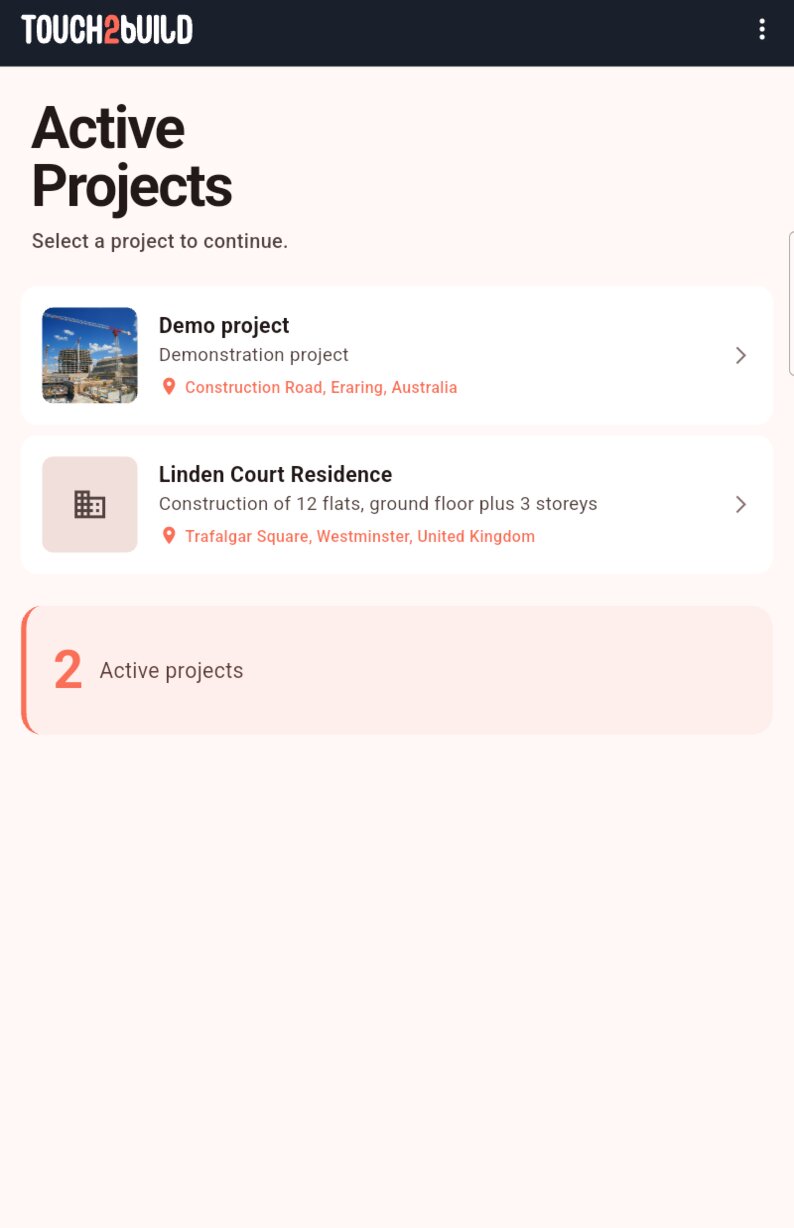
Pull the list down to refresh it.
No project yet?
If you are not a member of any project, the app offers Create example project: a project already filled with drawings, tasks and photos, so you can try the app.
The interface
Once in a project, the bottom bar gives access to four tabs:
| Tab | What it is for |
|---|---|
| Dashboard | The project's state at a glance and recent activity. |
| Drawings | The project's drawings and maps, organised in folders. This is where you record tasks. |
| Tasks | The task list, with filters and sorting. |
| More | Members, switching project, your settings and your accounts. |
To go back, tap the arrow at the top left of the screen. On Android, the Back key also goes back within the current tab, then to the dashboard, then to the project list. On iPhone and iPad, move between tabs with the bottom bar and switch project from the More tab.
Switch project
In the More tab, tap Change project.